Thursday, January 9, 2014

C# feature I miss in Java: extension methods

I'm primarily an Android developer, so when I checked the Java 8 features list I thought there is a lot of cool stuff, by sadly I won't be able to use them anytime soon. It's the same case as AutoCloseable interface from Java 7. It's available from API lvl 19, and seeing how long it takes Android community to unanimously drop the support for Froyo, Gingerbread and Honeycomb, I think won't be able to use it before 2017. Anyways, good stuff is added to Java, but there is one cool feature from C# I do not see there: extension methods.

Let me explain to you what they are in case you haven't wrote any C# code. In almost every code base there are simple utility methods which operate on a single object.
public static final class CollectionsUtils {
  public static <E> Collection<E> filter(Collection<E> unfiltered, Predicate<? super E> predicate) { /* ... */ };
  public static <F, T> Collection<T> transform(Collection<F> fromCollection, Function<? super F, T> function) { /* ... */ };
}

// usage
CollectionsUtils.filter(list, IS_NOT_NULL);
Things get ugly when you want to call multiple utility methods:
CollectionsUtils.transform(CollectionsUtils.filter(list, IS_NOT_NULL), TO_STRING);
C# allows you to add "this" modifier to the first parameter of static method, which basically tells the compiler to pretend that the objects of that type have a method with the same signature as our static method, sans the "this" parameter. Underneath it's treated exactly as the ugly nested calls above, but it allows you to write the code this way:
list.filter(IS_NOT_NULL).transform(TO_STRING);
Syntactic sugar, but it goes a long way. I've intentionally choose the methods for this examples - whole LINQ-to-objects interface is based on extension methods.

Java 8 introduces a feature with similar name but completely different functionality: virtual extension methods. Simply put it allows merging the Foo interface and AbstractFoo abstract class with a reasonable implementation of some of Foo's methods. For example if your interface has size() method you can add the isEmpty() virtual extension method with default implementation returning true when size() returns 0. So it's a nice feature, but IMO less powerful than C# solution. Both solutions allow adding new methods with default implementation to interfaces you wrote without having to worry about backwards compatibility, but C# extension methods allows you also to extend 3rd party or even java.lang intefaces and classes to make their API cleaner or better suited to your particular problem.

I wonder why the C#-style extension methods weren't added to Java 8. Maybe there are some implementation issues I do not see, maybe there is a conflict with another language features, maybe the powers that be think it would be inconsistent with the language philosophy. Do let me know if you have such information.

Friday, January 3, 2014

Offline mode in Android apps, part 2 - SQLite's ALTER TABLE

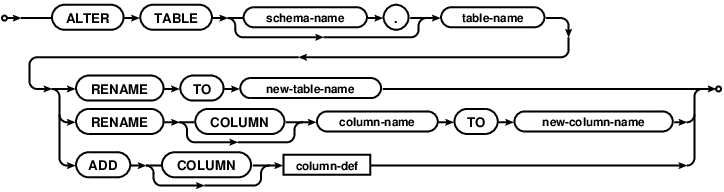
In first part of this series I showed that to implement offline mode in your Android app you have to implement data migrations. If you're using SQLite database, it means you'll have to use (or rather work around) it's ALTER TABLE syntax:


So all you can do with it is adding the column or renaming the table, but in reality you probably need to alter a single column, remove column or change the table constraints. You can achieve this by doing the following operation:
  1. Rename the table T with old schema to old_T.
  2. Create the table T with new schema.
  3. Use "INSERT INTO T (new_columns) SELECT old_columns FROM old_T" query to populate the table T with the data from the renamed table old_T.
  4. Drop old_T.
Doing it manually is quite error prone though: for every migration you have to specify the new_columns and old_columns list. What's worse, in 95% of cases you just want to list the columns common for old and new schema. Fortunately we can automate such trivial migrations by executing SELECT with LIMIT 0 (or PRAGMA TABLE_INFO) for both tables, getting the columns set using Cursor.getColumnNames(), and calculating these columns sets intersection.

You can write a nice wrapper for this yourself, but a) I already did it, so you don't have to and b) there is a very nasty gotcha which would probably cost you few hours of teeth grinding, so do yourself a favor and check this repository out, especially the MigrationsHelper class. It automates the trivial migrations and allows you to define a mappings for situations when you rename the column or add a non-nullable column in new schema.

In the next two posts I'll describe the gotcha I've mentioned in the previous paragraph and show some other non-obvious consequences of doing data migrations.

2013 summary

One year ago I set myself few goals for 2013. Let's take a look how it went:

  1. I gave two talks.
  2. My blog was viewed over 13k times.
  3. I have published another game on Nokia Store.
  4. I have authored or contributed to several open source projects.

Meeting two out of three goals and some open source bonus ain't that bad. The gloating part is done, let's move to the wishful thinking part, a.k.a. goals for 2014:


  1. Keep giving the talks. I find that preparing the presentation forces me to do thorough investigation of the topic, question all my assumptions and prepare answers for potential questions. This is probably the best way to learn about something, and as a bonus you're sharing that knowledge afterwards. 
  2. Blog more. This year for each post I wrote I have added at least one more topic to my blog todo list. The resolution for this year is clearing this backlog and generating at least 25k views. BTW: when I started this blog I feared that I won't have enough content to write regularly. Bollocks.
  3. Publish at least one app on Google Play.
  4. Keep working on the libraries I have published this year. It might not be a perfect metric of how useful to others my work turns out to be, but I'd like to accumulate 200 Github stars total on the projects I authored or co-authored.
The only thing left to be done is to wish you a happy New Year!

Friday, December 27, 2013

To Guava or not to Guava?

I faced this dilemma recently, when I was preparing first release of Cerberus utility for Android. On one hand, in Cerberus I used a tiny subset of Guava features which can be trivially rewritten in vanilla Java in 15 minutes, so maybe I should not force Guava down peoples throat?  On the other hand I'm a huge fan of Guava and I think you should definitely use it in anything more complicated than "Hello, world!" tutorial, because it either reduces a boilerplate or replaces your handrolled utilities with better, faster and more thoroughly tested implementations.

The "this library bloats my apk" argument is moot, because you can easily set up the ProGuard configuration which only strips the unused code, without doing any expensive optimizations. It's a good idea, because the dex input will be smaller, which speeds up the build and the apk will be smaller, which reduces time required to upload and install the app on the device.

I found the problem though, which is a bit harder to solve. Modern versions of Guava use some Java 1.6 APIs, which are available from API level 9, so when you try to use it on Android 2.2 (API level 8), you'll get the NoSuchMethodException or some other unpleasant runtime error (side note: position #233 on my TODO list was a jar analyzer which finds this problem). On Android 2.2 you're stuck with Guava 13.0.1.

This extends also to Guava as a library dependency. If one library supports Android 2.2 and older, it forces old version of Guava as dependency. And if another library depends on more recent version of Guava, you're basically screwed.

One conclusion you can draw from this blog post is that you shouldn't use Guava in your open source libraries to prevent dependency hell, but that's spilling the baby with the bathwater. The problem is not Guava or any other library, the problem are Java 1.6 methods missing from Android API level 8! The statistics from Google indicates that Froyo is used by 1.6%, in case of Base CRM user base it's only 0.2%. So more reasonable course of action is finally bumping minSdkVersion to 10 (or event 14), both for your applications and all the libraries.

Thursday, December 26, 2013

Offline mode in Android apps, part 1 - data migrations

This year I gave a talk on Krakdroid conference about offline mode in Android apps. By offline mode I mean implementing the app such way that the network availability is completely transparent to the end users. The high level implementation idea is to decouple the operations changing the data from sending these changes through unreliable network by saving the changes in local database and sending them at convinient moment. We have encountered two major problems when we implemented this behavior in Base CRM: data migrations and identifying entities. This blog post describes the first issue.

It might not be obvious why do you need the data migrations, so let's clear this out. Let's say on your mobile you have some data synced with backend (green squares on left and right) and some unsynced data created locally on mobile (red squares on the left).


Now let's say that we introduce new functionality to our app, which changes the schema of our data models (the squares on the backend side are changed to circles).


The schema of the local database have to be changed as well. The naive way of handling this situation is dropping old database with old schema, creating new one with new schema and resyncing all the data from backend, but there are two issues with this approach: if there is a lot of data the resyncing might take a while, which negates the most important advantage of offline mode - that the app is fully functional all the time.


More serious issue is that dropping the old database means that the unsynced data will be dropped along with it.


The only way to provide the optimal user experience is to perform schema migrations locally for both synced and unsynced data:


Migrating the data doesn't sound like a challenging thing to code, but the combination of obscure SQLite and Android issues complicates the matter. Without proper tools it's quite easy to make your code unmaintainable in the long run. I'll describe this issues and our solutions in the further posts.

Tuesday, December 24, 2013

Krakdroid 2013

At the beginning of the December I had an opportunity to gave a talk on a Krakdroid conference. The organizers outdid themselves this year, the venue, other speakers and the overall event atmosphere was amazing. Definitely a place to be at if you're in Krakow at the end of the year.

This year I talked about the offline mode in Android apps. The talk was 30% sales pitch, 10% shameless plug and 60% describing the pitfalls one can fall into when implementing offline mode. I'm going to describe two major problems with offline mode in details on my blog and here are the slides:

Protip on giving a public speech - take a sip of water every 2-3 slides, especially if you're not feeling well and you have a sore throat.

I got an atrocious headache in the afternoon and went home, so I didn't see all the talks, but I've seen the rare thing - a succesful live coding - by +Wojtek Erbetowski who presented the RoboSpock testing framework and incrementally turned a meh-Java code into concise Groove goodness. +Maciej Górski did the maps framework overview, and although he's the author of excellent Android Maps Extensions he managed to be surprisingly objective. The first talk by +Wojtek Kaliciński triggered an internal discussion and Base about reducing the support for old Android versions. It won't happen overnight, but at least we've moved from the dangerous "c'mon, it's not that hard to support Froyo" mindtrack. I'll definitely write more about this.

To summarise, it was a great event. I've learned a lot, I've met some interesting people and I gave another talk, which completes one of the goals I set myself up for 2013. Good stuff.

Tuesday, December 3, 2013

SQLite views gotcha

tl;dr: don't left join on view, or you gonna have a bad time.

I have investigated a performance issue of the db in Android app today. The symptoms looked like a classic case of the missing index: the performance degraded with adding more data to certain tables. However, the quick check of sqlite_master table and looking at some EXPLAIN QUERY PLAN queries indicated that everything is properly indexed (which is not very surprising, given that we use android-autoindexer).

I started dumping the explain query plans for every query and it turned out that some queries perform multiple table scans instead of single scan of main table + indexed searches for joined tables. It means that the indices were in place, but they weren't used.

The common denominator of these queries was joining with a view. Here's the simplest schema which demonstrates the issue:

sqlite> create table x (id integer);
sqlite> create table y (id integer, x_id integer);

sqlite> explain query plan select * from x left join y on x.id = x_id;
selectid    order       from        detail
----------  ----------  ----------  ----------------------------------------------------------------
0           0           0           SCAN TABLE x (~1000000 rows)
0           1           1           SEARCH TABLE y USING AUTOMATIC COVERING INDEX (x_id=?) (~7 rows)

sqlite> create view yyy as select * from y;

sqlite> explain query plan select * from x left join yyy on x.id = x_id;
selectid    order       from        detail
----------  ----------  ----------  -------------------------------------------------------------------
1           0           0           SCAN TABLE y (~1000000 rows)
0           0           0           SCAN TABLE x (~1000000 rows)
0           1           1           SEARCH SUBQUERY 1 USING AUTOMATIC COVERING INDEX (x_id=?) (~7 rows)

Of course this behaviour is documented in the SQLite Query Planner overview (point 3 of the Subquery flattening paragraph), and I even remember reading this docs few times, but I guess something like this has to bite me in the ass before I memorize it.

Everything works fine if you copypaste the views selection in place of the joined view, which makes me a sad panda, because I wish SQLite could do this for me. On the other hand it's a very simple workaround for this issue, and, with a right library, the code might even be manageable.