I finally got fed up with Blogger interface and decided to migrate my blog. I've tried Jekyll, but the default theme and all the existing themes were too plain for my taste and I have neither skills nor time to learn those skills to make it look better. Then I found Octopress, which is exactly what I was looking for: hosted on github, markdown based, and decent looking blogging platform.
This is the last post on this blog, new content will appear only on chalup.github.io. I've migrated all the older posts, hopefully all the links and images work, but if you find anything broken please let me know.
Tuesday, June 3, 2014

Thursday, May 22, 2014
Clicking unclickable list items
One of the UI patterns that improve lists usability is dividing items into sections. The section might be the first letter of the main text on the list item, date formatted and rounded in a specific way or whatever makes sense for your data.
From the technical point of view you can either add the header view to every list item and show and hide them as needed or create the separate view for header and regular list item and register multiple view types in your Adapter. Both options were described in details by +Cyril Mottier in excellent ListView Tips & Tricks #2: Sectioning Your ListView blog post.
If you choose the second approach, you'll have to decide what to return from your Adapter's getItem and getItemId methods for items representing sections. If your sections are not supposed to be clickable, you might implement your Adapter like this:
I didn't investigate the issue thoroughly, but it seems there must be some disparity between checking the isEnabled method and getting the item. If I ever dive into ListView code, I'll definitely write about it. If you want to reproduce or investigate the issue yourself, compile this project and run the monkey:
From the technical point of view you can either add the header view to every list item and show and hide them as needed or create the separate view for header and regular list item and register multiple view types in your Adapter. Both options were described in details by +Cyril Mottier in excellent ListView Tips & Tricks #2: Sectioning Your ListView blog post.
If you choose the second approach, you'll have to decide what to return from your Adapter's getItem and getItemId methods for items representing sections. If your sections are not supposed to be clickable, you might implement your Adapter like this:
@Override
public Object getItem(int position) {
  return getItemViewType(position) == TYPE_ITEM
      ? mItems[getCursorPosition(position)]
      : null;
}

@Override
public long getItemId(int position) {
  return getItemViewType(position) == TYPE_ITEM
      ? getCursorPosition(position)
      : 0;
}

@Override
public boolean areAllItemsEnabled() {
  return false;
}

@Override
public boolean isEnabled(int position) {
  return getItemViewType(position) == TYPE_ITEM;
}
And your onListItemClickListener like this:@Override
public void onListItemClick(ListView l, View v, int position, long id) {
super.onListItemClick(l, v, position, id);
// dummy action which uses Object returned from getItem(position)
Log.d("DMFM", getListAdapter().getItem(position).toString());
}
If you do so, the Android has a nasty surprise for you:java.lang.NullPointerException
at org.chalup.dialmformonkey.app.MainFragment.onListItemClick(MainFragment.java:38)
at android.app.ListFragment$2.onItemClick(ListFragment.java:160)
at android.widget.AdapterView.performItemClick(AdapterView.java:298)
at android.widget.AbsListView.performItemClick(AbsListView.java:1100)
at android.widget.AbsListView$PerformClick.run(AbsListView.java:2749)
at android.widget.AbsListView$1.run(AbsListView.java:3423)
at android.os.Handler.handleCallback(Handler.java:725)
...
The only way this can happen is getting null from Adapter.getItem(), but this method will be called only for disabled items, right?@Override
public void onListItemClick(ListView l, View v, int position, long id) {
super.onListItemClick(l, v, position, id);
Log.d("DMFM", "Clicked on item " + position + " which is " +
(getListAdapter().isEnabled(position)
? "enabled"
: "disabled")
);
// dummy action which uses Object returned from getItem(position)
Log.d("DMFM", getListAdapter().getItem(position).toString());
}
Wrong:
D/DMFM﹕ Clicked on item 4 which is enabled
D/DMFM﹕ Abondance
D/DMFM﹕ Clicked on item 4 which is enabled
D/DMFM﹕ Abondance
D/DMFM﹕ Clicked on item 31 which is enabled
D/DMFM﹕ Aragon
D/DMFM﹕ Clicked on item 31 which is enabled
D/DMFM﹕ Aragon
D/dalvikvm﹕ GC_CONCURRENT freed 138K, 3% free 8825K/9016K, paused 0ms+0ms, total 3ms
D/DMFM﹕ Clicked on item 28 which is disabled
It's very difficult to reproduce this error manually, especially if tapping the list item does something more than writing to logcat, but I investigated this issue, because the stack traces above appeared in crash reports on Google Analytics, so several people managed to click exactly wrong area at the wrong time.
I didn't investigate the issue thoroughly, but it seems there must be some disparity between checking the isEnabled method and getting the item. If I ever dive into ListView code, I'll definitely write about it. If you want to reproduce or investigate the issue yourself, compile this project and run the monkey:
$ adb shell monkey -p org.chalup.dialmformonkey.app -v 500So what can we do? First option is checking the Adapter.isEnabled() in your onListItemClick listener, which is yet another kind of boilerplate you have to add to your Android code, but it's super easy to add. The other option is going with the first sectioning approach, i.e. putting section as a part of the clickable list item, but it might not work for your use case (for example adapter with multiple item types).
Saturday, May 10, 2014
Android App Widgets issues
This week I spend few days analyzing and fixing various issues of app widget in Base CRM application.
This part of our codebase was created over a year ago during one of our internal hackathons and was released soon after that. Most of the times it worked. Every once in a while we received a weird crash report from Google Analytics, but it never caused much trouble. Recently though we received few complaints from customers. I happened to have few hours available for bug hunting, so I took a dive.
The widget is really a simple todo list backed by ContentProvider. The code looks like it was based on the WeatherWidget from SDK samples. What can possibly go wrong?
The sample author obviously intended to create only one worker thread - the sWorkerThread is the static - but forgot to do the null check before creating a new thread. So let's fix it:
The onEnabled callback is called when the first instance of the widget is added to homescreen, so the code looks fine. Unfortunately the callback is not called at your process startup. So if your app is updated and the process is restarted, the ContentObserver won't be registered. The same thing happens if your app crashes or is stopped by the OS to free resources.
To solve this you have to register the ContentObserver in few more places. I have added registration to onCreate callback in RemoteViewsFactory and the onReceive part which handles our custom actions in AppWidgetProvider.
WeatherWidget sample does one more thing wrong: the ContentObserver is never unregistered and the worker thread is never stopped. The correct place to do this is onDisabled callback in AppWidgetProvider.
The reproduction steps for this issue are quite complicated:
It turns out this happens when the Homescreen activity is recreated because of low memory condition. To easily reproduce this issue you can check the "Don't keep activities" in developers settings.
I do not have a solution or workaround for this issue unfortunately. I'll file a bug report and hope for the best.
This part of our codebase was created over a year ago during one of our internal hackathons and was released soon after that. Most of the times it worked. Every once in a while we received a weird crash report from Google Analytics, but it never caused much trouble. Recently though we received few complaints from customers. I happened to have few hours available for bug hunting, so I took a dive.
The widget is really a simple todo list backed by ContentProvider. The code looks like it was based on the WeatherWidget from SDK samples. What can possibly go wrong?
Issue #1: gazillions of threads started
Take a look at the code of WeatherWidgetProvider:public WeatherWidgetProvider() {
// Start the worker thread
sWorkerThread = new HandlerThread("WeatherWidgetProvider-worker");
sWorkerThread.start();
sWorkerQueue = new Handler(sWorkerThread.getLooper());
}
The WeatherWidgetProvider is an AppWidgetProvider implementation, which extends a regular BroadcastReceiver. It means that for every action a new instance of WeatherWidgetProvider is created, and the current implementation spawns new thread which is never closed.The sample author obviously intended to create only one worker thread - the sWorkerThread is the static - but forgot to do the null check before creating a new thread. So let's fix it:
public WeatherWidgetProvider() {
  if (sWorkerThread == null) {
    // Start the worker thread
    sWorkerThread = new HandlerThread("WeatherWidgetProvider-worker");
    sWorkerThread.start();
    sWorkerQueue = new Handler(sWorkerThread.getLooper());
  }
}
Issue #2: no refresh after application update
The widget shows data from the same ContentProvider as the main app, so when the user creates a task inside in the main app and then goes back to homescreen, the task should be displayed on the widget. To achieve this we did the same thing the WeatherWidget sample does - we register the ContentObserver in onEnabled callback of AppWidgetProvider:@Override
public void onEnabled(Context context) {
final ContentResolver r = context.getContentResolver();
if (sDataObserver == null) {
final AppWidgetManager mgr = AppWidgetManager.getInstance(context);
final ComponentName cn = new ComponentName(context, WeatherWidgetProvider.class);
sDataObserver = new WeatherDataProviderObserver(mgr, cn, sWorkerQueue);
r.registerContentObserver(WeatherDataProvider.CONTENT_URI, true, sDataObserver);
}
}
The onEnabled callback is called when the first instance of the widget is added to homescreen, so the code looks fine. Unfortunately the callback is not called at your process startup. So if your app is updated and the process is restarted, the ContentObserver won't be registered. The same thing happens if your app crashes or is stopped by the OS to free resources.
To solve this you have to register the ContentObserver in few more places. I have added registration to onCreate callback in RemoteViewsFactory and the onReceive part which handles our custom actions in AppWidgetProvider.
WeatherWidget sample does one more thing wrong: the ContentObserver is never unregistered and the worker thread is never stopped. The correct place to do this is onDisabled callback in AppWidgetProvider.
Issue #3: CursorOutOfBoundsException crash
Ever since we introduced the tasks widget, we've occasionally received the crash reports indicating that the RemoteViewsFactory requested elements outside of [0, getCount) range:05-10 15:22:50.559 13781-13795/org.chalup.widgetfail.widget E/AndroidRuntime﹕ FATAL EXCEPTION: Binder_2
Process: org.chalup.widgetfail.widget, PID: 13781
android.database.CursorIndexOutOfBoundsException: Index 1 requested, with a size of 1
The reproduction steps for this issue are quite complicated:
- Tap the task on the widget to mark it was completed. Internally we set the PENDING_DONE flag, so the task is marked as done, but is still displayed on the list, so the user can tap it again and reset the flag.
- Trigger the sync
- SyncAdapter syncs the Task to our backend. The task is marked as DONE in our database, which triggers the ContentObserver registered by the widget.
- ContentObserver triggers onDataSetChanged callback in RemoteViewsFactory, which then calls getCount and getViewAt
- In some rare cases getViewAt with position == result of getCount is called
@Override
public synchronized RemoteViews getViewAt(int position) {
  if (position >= mCursor.getCount()) {
    return getLoadingView();
  } else {
    mCursor.moveToPosition(position);

    // ...
  }
}
Issue #4: no refresh when "Don't keep activities" setting is enabled
User can click on the tasks displayed on the widget to go to the edit screen. The activity is closed when user saves or discards changes and the homescreen with the widget is shown again. Changing the task triggers the ContentObserver, the onDataSetChanged is called on all active RemoteViewsFactories, but sometimes other callbacks (getCount, getViewAt, etc.) are not called.It turns out this happens when the Homescreen activity is recreated because of low memory condition. To easily reproduce this issue you can check the "Don't keep activities" in developers settings.
I do not have a solution or workaround for this issue unfortunately. I'll file a bug report and hope for the best.
Recap
There are mutliple issues with the WeatherWidget sample and some issues with the system services responsible for populating app widgets with content. I've created a simple project which reproduces the issues #3 and #4 and shows the correct way of registering ContentObserver for your widget. The sources are available on Github.Tuesday, February 25, 2014
Use minSdkVersion=10 for libraries
I've pushed new versions of microorm and thneed to Maven Central today. The most notable change for both libraries is dropping the support for Android 2.2 and earlier versions. The same change was applied to all Android libraries open sourced by Base. Why? +Jeff Gilfelt summed it up nicely:
Your own code can (and should) be checked with Lint, but these methods and classes can also be used by the 3rd party libraries and I'm not aware of any static analysis tool that can help you in this case. So if your app supports Froyo and uses a lot of external dependencies, you're probably sitting on the NoClassDefFoundError bomb. It might force you to use obsolete versions of libraries, the most notable example of which is Guava - on Froyo you have to use 13.0.1, a 18 months old version.
That's also the reason why the libraries authors should be the first ones to move on to Android 2.3 and later. If you use obsolete library in your application, you're hurting only yourself. If you use it as a library dependency, you're hurting every user of the library.
So move on and bump the minSdkVersion. After all, it's 2014.
Because it is 2014 https://t.co/UCMaZOB6Sl
— Jeff Gilfelt (@readyState) February 17, 2014
This tweet is a good laugh, and an excellent example of what happens if you limit the discussion to 140 characters, but there are poor souls who might need an answer they can use as an objective argument. For them, here is my take on this one: you should drop support for Froyo because sizeable chunk of Java 1.6 APIs were missing from API level 8. I'm not talking about some dark corners of java packages, I'm talking about stuff like String.isEmpty(), Deque, NavigableSet, IOException's constructors with cause parameter, and so on.Your own code can (and should) be checked with Lint, but these methods and classes can also be used by the 3rd party libraries and I'm not aware of any static analysis tool that can help you in this case. So if your app supports Froyo and uses a lot of external dependencies, you're probably sitting on the NoClassDefFoundError bomb. It might force you to use obsolete versions of libraries, the most notable example of which is Guava - on Froyo you have to use 13.0.1, a 18 months old version.
That's also the reason why the libraries authors should be the first ones to move on to Android 2.3 and later. If you use obsolete library in your application, you're hurting only yourself. If you use it as a library dependency, you're hurting every user of the library.
So move on and bump the minSdkVersion. After all, it's 2014.
Thursday, February 20, 2014
When do you absolutely need WakefulBroadcastReceiver
Yesterdays #AndroidDev #Protip explains how to use WakefulBroadcastReceiver utility class and what problem does it solve, but it doesn't mention a case when using it or manually acquiring WakeLock is essential - using the AlarmManager.
If you're not familiar with AlarmManager's API, here is tl;dr of the docs: it allows you to specify the PendingIntent that should be fired at some point, even if your application is in background. The common use cases for using AlarmManager is for example showing a Notification at the specified time or sending some kind of heartbeat to your backend. In both cases, your code performs potentially long running operation (in case of showing notification you might need some content from your local database), so you don't want to run it in the UI thread. The first thing that comes to mind is to specify an IntentService as a PendingIntent target:

It's not explicitly documented, but both +Dianne Hackborn and +CommonsWare confirmed this. The workaround is to use PendingIntent.getBroadcast(), because it is guaranteed that the BroadcastReceiver.onReceive() will be always fully executed before the CPU goes to sleep. Inside that callback you have to acquire WakeLock start your IntentService and release the lock at the end of onHandleIntent() method.

This is where the WakefulBroadcastReceiver comes into play: its startWakefulService and completeWakefulIntent static methods encapsulate all the WakeLocks juggling, allowing you to focus on your business logic.
If you're not familiar with AlarmManager's API, here is tl;dr of the docs: it allows you to specify the PendingIntent that should be fired at some point, even if your application is in background. The common use cases for using AlarmManager is for example showing a Notification at the specified time or sending some kind of heartbeat to your backend. In both cases, your code performs potentially long running operation (in case of showing notification you might need some content from your local database), so you don't want to run it in the UI thread. The first thing that comes to mind is to specify an IntentService as a PendingIntent target:
PendingIntent intent = PendingIntent.getService(
  context,
  0,
  new Intent(context, MyIntentService.class),
  PendingIntent.FLAG_UPDATE_CURRENT
);

AlarmManager alarmManager = (AlarmManager) context.getSystemService(Context.ALARM_SERVICE);
alarmManager.set(
  AlarmManager.ELAPSED_REALTIME_WAKEUP,
  SystemClock.elapsedRealtime() + TimeUnit.MINUTES.toMillis(15)
  intent
);
This code won't always work though. While it is guaranteed that the alarm will go off and the PendingIntent will be sent, because we used a _WAKEUP alarm type, the device is allowed to go back to sleep before the service is started.
It's not explicitly documented, but both +Dianne Hackborn and +CommonsWare confirmed this. The workaround is to use PendingIntent.getBroadcast(), because it is guaranteed that the BroadcastReceiver.onReceive() will be always fully executed before the CPU goes to sleep. Inside that callback you have to acquire WakeLock start your IntentService and release the lock at the end of onHandleIntent() method.
This is where the WakefulBroadcastReceiver comes into play: its startWakefulService and completeWakefulIntent static methods encapsulate all the WakeLocks juggling, allowing you to focus on your business logic.
Saturday, January 25, 2014
Offline mode in Android apps, part 3 - old db schemas
The first post in this series explained the first consequence on implementing the offline mode - performing the data migrations. In second part I showed a workaround for the rudimentary SQLite's ALTER TABLE syntax. If you have checked the link to MigrationHelper class I mentioned, you migth have noticed that it's just a tiny part of a larger library, which allows you to define database schemas. Note the plural "schemas": the whole point of this library is defining both current schema and the schemas for the older versions of your app. This post explains why do you have to do this.
Let's say in the first version you have the following data structure:
The worst thing about this kind of bugs is that it might slip through your tests, because the crash happens only if you have a specific data before the application update.
You migth be tempted to define separate migrations from every old version to the latest one (in our case migrations from v1 to v3 and from v2 to v3) and always execute only single migration, but this workaround doesn't scale. For each new migration you'd have to check and potentially update every existing migration. When you publish the app twice a month, this quickly becomes a huge problem.
The other solution is to make every migration completely independent from the others, and execute them sequentially. This way, when you define a new migration, you don't have to worry about the previous ones. This means that when you upgrade from v1 to v3, you first upgrade from v1 to v2 and then from v2 to v2 and after the first step the database should be in the same state it were, when the v2 was the latest version. In other words, you have to keep an old database schemas.
As usual there are multiple ways to do this. You can copy the schema definition to another constant and append "ver#" suffix, but it means there will be a lot of duplicated code (although this code should never, ever change, so it's not as bad as the regular case of copypaste). The other way is to keep the initial database state and all the schema updates. The issue here is that you don't have a place in your code with current schema definition. The opposite solution is to keep the current schema and the list of downgrades. Sounds counterintuitive? Don't worry, that's because it *is* counterintuitive.
In android-schema-utils I've chosen the third approach, because in the long run it processes less data than the upgrades solution - in case of upgrade from vN-1 to vN it has to generate only 1 additional schema instead of N-1 schemas. I'm still not sure if the code wouldn't be clearer had I went with duplicated schema definitions approach, but the current approach, once you get used to it, works fine. The schema and migrations for our example would look like this:
If you go this way, your onUpgrade method, which usually is the most complex part of SQLiteOpenHelper, can be reduced to this:
Let's say in the first version you have the following data structure:
public static class User {
  public long id;
  public String firstName;
  public String lastName;
  public String email;
}
And the table definition for this table in your SQLiteOpenHelper looks like this:private static final String CREATE_TABLE_USERS = "CREATE TABLE " +
TABLE_USERS +
" ( " +
ID + " INTEGER PRIMARY KEY AUTOINCREMENT " + ", " +
FIRST_NAME + " TEXT " + ", " +
LAST_NAME + " TEXT " + ", " +
EMAIL + " TEXT " +
" ) ";
In the next version you decide to keep only the first name in a single field, so you change your data structure accordingly and perform the data migration. In the snippet below I used the MigrationHelper, but you might have as well performed the migration by hand:private static final String CREATE_TABLE_USERS = "CREATE TABLE " +
TABLE_USERS +
" ( " +
ID + " INTEGER PRIMARY KEY AUTOINCREMENT " + ", " +
NAME + " TEXT " + ", " +
EMAIL + " TEXT " +
" ) ";
@Override
public void onUpgrade(SQLiteDatabase db, int oldVersion, int newVersion) {
MigrationsHelper helper = new MigrationsHelper();
if (oldVersion < 2) {
helper.performMigrations(db,
TableMigration.of(TABLE_USERS)
.to(CREATE_TABLE_USERS)
.withMapping(NAME, FIRST_NAME)
.build()
);
}
}
Then you decide that the email field should be mandatory, so you change the schema and migrate the data again:private static final String CREATE_TABLE_USERS = "CREATE TABLE " +
TABLE_USERS +
" ( " +
ID + " INTEGER PRIMARY KEY AUTOINCREMENT " + ", " +
NAME + " TEXT " + ", " +
EMAIL + " TEXT NOT NULL" +
" ) ";
@Override
public void onUpgrade(SQLiteDatabase db, int oldVersion, int newVersion) {
MigrationsHelper helper = new MigrationsHelper();
if (oldVersion < 2) {
helper.performMigrations(db,
TableMigration.of(TABLE_USERS)
.to(CREATE_TABLE_USERS)
.withMapping(NAME, FIRST_NAME)
.build()
);
}
if (oldVersion < 3) {
db.execSQL("DELETE FROM " + TABLE_USERS + " WHERE " + EMAIL + " IS NULL");
helper.performMigrations(db,
TableMigration.of(TABLE_USERS)
.to(CREATE_TABLE_USERS)
.build()
);
}
}
The code looks fine, but you have just broken migrations from v1 to v3. If there is an user with a null email field, the app will crash in line 13 above. But why, shouldn't the email field in v2 schema be nullable? It should, but this migration uses the constant containing the latest schema definition with different column constraint.The worst thing about this kind of bugs is that it might slip through your tests, because the crash happens only if you have a specific data before the application update.
You migth be tempted to define separate migrations from every old version to the latest one (in our case migrations from v1 to v3 and from v2 to v3) and always execute only single migration, but this workaround doesn't scale. For each new migration you'd have to check and potentially update every existing migration. When you publish the app twice a month, this quickly becomes a huge problem.
The other solution is to make every migration completely independent from the others, and execute them sequentially. This way, when you define a new migration, you don't have to worry about the previous ones. This means that when you upgrade from v1 to v3, you first upgrade from v1 to v2 and then from v2 to v2 and after the first step the database should be in the same state it were, when the v2 was the latest version. In other words, you have to keep an old database schemas.
As usual there are multiple ways to do this. You can copy the schema definition to another constant and append "ver#" suffix, but it means there will be a lot of duplicated code (although this code should never, ever change, so it's not as bad as the regular case of copypaste). The other way is to keep the initial database state and all the schema updates. The issue here is that you don't have a place in your code with current schema definition. The opposite solution is to keep the current schema and the list of downgrades. Sounds counterintuitive? Don't worry, that's because it *is* counterintuitive.
In android-schema-utils I've chosen the third approach, because in the long run it processes less data than the upgrades solution - in case of upgrade from vN-1 to vN it has to generate only 1 additional schema instead of N-1 schemas. I'm still not sure if the code wouldn't be clearer had I went with duplicated schema definitions approach, but the current approach, once you get used to it, works fine. The schema and migrations for our example would look like this:
private static final MigrationsHelper MIGRATIONS_HELPER = new MigrationsHelper();
private static final Schemas SCHEMAS = Schemas.Builder
    .currentSchema(3,
        new TableDefinition(TABLE_USERS,
            new AddColumn(ID, "INTEGER PRIMARY KEY AUTOINCREMENT"),
            new AddColumn(NAME, "TEXT"),
            new AddColumn(EMAIL, "TEXT NOT NULL")
        )
    )
    .upgradeTo(3,
        new SimpleMigration() {
          @Override
          public void apply(SQLiteDatabase db, Schema schema) {
            db.execSQL("DELETE FROM " + TABLE_USERS + " WHERE " + EMAIL + " IS NULL");
          }
        },
        auto()
    )
    .downgradeTo(2,
        new TableDowngrade(TABLE_USERS, new AddColumn(EMAIL, "TEXT"))
    )
    .upgradeTo(2,
        SimpleTableMigration.of(TABLE_USERS)
            .withMapping(NAME, FIRST_NAME)
            .using(MIGRATIONS_HELPER)
        )
    .downgradeTo(1,
        new TableDowngrade(TABLE_USERS,
            new AddColumn(FIRST_NAME, "TEXT"),
            new AddColumn(LAST_NAME, "TEXT"),
            new DropColumn(EMAIL)
        )
    )
    .build();
There are other benefits of keeping the old schemas in a more reasonable format than raw strings. Most of the schema migrations can be deducted from comparing subsequent schema versions, so you don't have to do it yourself. For example in migration from v2 to v3 I didn't have to specify that I want to migrate the Users table - the auto() migration automatically handles it. If the auto() is the only migration for a given upgrade, you can skip the whole upgradeTo() block. In our case that covered about 50% migrations, but YMMV.If you go this way, your onUpgrade method, which usually is the most complex part of SQLiteOpenHelper, can be reduced to this:
@Override
public void onUpgrade(SQLiteDatabase db, int oldVersion, int newVersion) {
  SCHEMAS.upgrade(oldVersion, mContext, db);
}
This part concludes the "offline mode" series. Here's the short recap:- If you don't want to compromise on UX, your application should work regardless whether the user is connected to internet or not.
- In this case the user may end up in a situation when the application is upgraded, but not all data is synced with the server yet. You *do not* want to lose your users' data. You'll have to migrate them.
- If you migrate your data, you should keep the migrations separate from one another, because otherwise maintaining them becomes a nightmare.
- The best way to do this that I know of, is keeping the old schemas and always performing all migrations sequentially. To make things simpler, I recommend the android-schema-utils library.
Sunday, January 12, 2014
Android SQLiteDatabase gotcha
In my previous post I mentioned a nasty SQLiteDatabase gotcha and recommended using the MigrationHelper utility I wrote. If you have checked this class's sources, you might have noticed a weird code. Before getting the list of columns the table is renamed to the temporary name and then renamed back:
But the same thing could happen outside of MigrationHelper operations, for example if you need to iterate through rows of the same table in two different migrations:
On ICS the cache is implemented as LruCache, so theoretically you could evict old entries by filling the cache with new ones, but there is one hiccup - you don't know the cache size, so you'd always have to go with MAX_SQL_CACHE_SIZE.
Before ICS you couldn't do even that - the implementation of this "cache" is just a fixed size buffer for SQLiteStatements. Once that buffer is full, no more statements are cached. This also has one more consequence - your app might work much slower on Android 2.x after upgrade from old version than after fresh install, because the db cache will be filled with queries used in migrations.
Fortunately the keys of this cache are raw SQL strings, so we can disable cache for migration queries by adding "WHERE n==n" clause with n incremented for every query (note that you musn't pass n as a bound parameter - the whole point of adding this selection is to make the queries different and force SQLiteDatabase to compile another statement).
The question you should ask yourself is why do I have to know and care about all this. Isn't SQLite smart enough to see that I'm trying to access the database using prepared statement compiled against old schema? It turns out the SQLite detects this issues and raises SQLITE_SCHEMA error (commented with "The database schema changed"), but Android's SQLiteDatabase wrapper drops this error and happily uses the old, invalid statements. Bad Android.
final String tempTable = "tmp_" + tempTableIndex++;Initially the MigrationHelper's code looked like this:
db.execSQL("ALTER TABLE " + migration.tableName + " RENAME TO " + tempTable);
ImmutableSet<String> oldColumns = getColumns(db, tempTable);
db.execSQL(migration.createTableStatement);
final String tempNewTable = "tmp_" + tempTableIndex++;
db.execSQL("ALTER TABLE " + migration.tableName + " RENAME TO " + tempNewTable);
ImmutableSet<String> newColumns = getColumns(db, tempNewTable);
db.execSQL("ALTER TABLE " + tempNewTable + " RENAME TO " + migration.tableName);
private static ImmutableSet<String> getColumns(SQLiteDatabase db, String table) {
Cursor cursor = db.query(table, null, null, null, null, null, null, "0");
if (cursor != null) {
try {
return ImmutableSet.copyOf(cursor.getColumnNames());
} finally {
cursor.close();
}
}
return ImmutableSet.of();
}
static final String TEMP_TABLE = "tmp";It worked for a single migration, but didn't work for multiple migrations - the helper method for getting the column set always returned the columns of first table. Since the query was always the same, I suspected the results are cached somewhere. To verify this hypothesis I added to the temporary table name an index incremented with every migration. It worked, but then I realized I need to do the same for getting the columns of the new schema - otherwise the helper wouldn't work if the same table were migrated twice. This way the weird code was born.
db.execSQL("ALTER TABLE " + migration.tableName + " RENAME TO " + TEMP_TABLE);
ImmutableSet<String> oldColumns = getColumns(db, TEMP_TABLE);
db.execSQL(migration.createTableStatement);
ImmutableSet<String> newColumns = getColumns(db, migration.tableName);
But the same thing could happen outside of MigrationHelper operations, for example if you need to iterate through rows of the same table in two different migrations:
@Override
public void onUpgrade(final SQLiteDatabase db, int oldVersion, int newVersion) {
  if (oldVersion <= 1500) {
    Cursor c = db.query("some_table", /* null, null, null... */);
    // use Cursor c
  }

  // other migrations, including ones that change the some_table table's columns

  if (oldVersion <= 2900) {
    Cursor c = db.query("some_table", /* null, null, null... */);
    // try to use Cursor c and crash terribly
  }
}
So I checked the AOSP code for the suspected cache to see how the entries can be evicted or if the cache can be disabled. There are no methods for this, so you can't do it with straightforward call, but maybe you can exploit the implementation details?On ICS the cache is implemented as LruCache, so theoretically you could evict old entries by filling the cache with new ones, but there is one hiccup - you don't know the cache size, so you'd always have to go with MAX_SQL_CACHE_SIZE.
Before ICS you couldn't do even that - the implementation of this "cache" is just a fixed size buffer for SQLiteStatements. Once that buffer is full, no more statements are cached. This also has one more consequence - your app might work much slower on Android 2.x after upgrade from old version than after fresh install, because the db cache will be filled with queries used in migrations.
Fortunately the keys of this cache are raw SQL strings, so we can disable cache for migration queries by adding "WHERE n==n" clause with n incremented for every query (note that you musn't pass n as a bound parameter - the whole point of adding this selection is to make the queries different and force SQLiteDatabase to compile another statement).
The question you should ask yourself is why do I have to know and care about all this. Isn't SQLite smart enough to see that I'm trying to access the database using prepared statement compiled against old schema? It turns out the SQLite detects this issues and raises SQLITE_SCHEMA error (commented with "The database schema changed"), but Android's SQLiteDatabase wrapper drops this error and happily uses the old, invalid statements. Bad Android.
Thursday, January 9, 2014
C# feature I miss in Java: extension methods
I'm primarily an Android developer, so when I checked the Java 8 features list I thought there is a lot of cool stuff, by sadly I won't be able to use them anytime soon. It's the same case as AutoCloseable interface from Java 7. It's available from API lvl 19, and seeing how long it takes Android community to unanimously drop the support for Froyo, Gingerbread and Honeycomb, I think won't be able to use it before 2017. Anyways, good stuff is added to Java, but there is one cool feature from C# I do not see there: extension methods.
Let me explain to you what they are in case you haven't wrote any C# code. In almost every code base there are simple utility methods which operate on a single object.
Java 8 introduces a feature with similar name but completely different functionality: virtual extension methods. Simply put it allows merging the Foo interface and AbstractFoo abstract class with a reasonable implementation of some of Foo's methods. For example if your interface has size() method you can add the isEmpty() virtual extension method with default implementation returning true when size() returns 0. So it's a nice feature, but IMO less powerful than C# solution. Both solutions allow adding new methods with default implementation to interfaces you wrote without having to worry about backwards compatibility, but C# extension methods allows you also to extend 3rd party or even java.lang intefaces and classes to make their API cleaner or better suited to your particular problem.
I wonder why the C#-style extension methods weren't added to Java 8. Maybe there are some implementation issues I do not see, maybe there is a conflict with another language features, maybe the powers that be think it would be inconsistent with the language philosophy. Do let me know if you have such information.
Let me explain to you what they are in case you haven't wrote any C# code. In almost every code base there are simple utility methods which operate on a single object.
public static final class CollectionsUtils {
  public static <E> Collection<E> filter(Collection<E> unfiltered, Predicate<? super E> predicate) { /* ... */ };
  public static <F, T> Collection<T> transform(Collection<F> fromCollection, Function<? super F, T> function) { /* ... */ };
}

// usage
CollectionsUtils.filter(list, IS_NOT_NULL);
Things get ugly when you want to call multiple utility methods:CollectionsUtils.transform(CollectionsUtils.filter(list, IS_NOT_NULL), TO_STRING);C# allows you to add "this" modifier to the first parameter of static method, which basically tells the compiler to pretend that the objects of that type have a method with the same signature as our static method, sans the "this" parameter. Underneath it's treated exactly as the ugly nested calls above, but it allows you to write the code this way:
list.filter(IS_NOT_NULL).transform(TO_STRING);Syntactic sugar, but it goes a long way. I've intentionally choose the methods for this examples - whole LINQ-to-objects interface is based on extension methods.
Java 8 introduces a feature with similar name but completely different functionality: virtual extension methods. Simply put it allows merging the Foo interface and AbstractFoo abstract class with a reasonable implementation of some of Foo's methods. For example if your interface has size() method you can add the isEmpty() virtual extension method with default implementation returning true when size() returns 0. So it's a nice feature, but IMO less powerful than C# solution. Both solutions allow adding new methods with default implementation to interfaces you wrote without having to worry about backwards compatibility, but C# extension methods allows you also to extend 3rd party or even java.lang intefaces and classes to make their API cleaner or better suited to your particular problem.
I wonder why the C#-style extension methods weren't added to Java 8. Maybe there are some implementation issues I do not see, maybe there is a conflict with another language features, maybe the powers that be think it would be inconsistent with the language philosophy. Do let me know if you have such information.
Friday, January 3, 2014
Offline mode in Android apps, part 2 - SQLite's ALTER TABLE
In first part of this series I showed that to implement offline mode in your Android app you have to implement data migrations. If you're using SQLite database, it means you'll have to use (or rather work around) it's ALTER TABLE syntax:

So all you can do with it is adding the column or renaming the table, but in reality you probably need to alter a single column, remove column or change the table constraints. You can achieve this by doing the following operation:
You can write a nice wrapper for this yourself, but a) I already did it, so you don't have to and b) there is a very nasty gotcha which would probably cost you few hours of teeth grinding, so do yourself a favor and check this repository out, especially the MigrationsHelper class. It automates the trivial migrations and allows you to define a mappings for situations when you rename the column or add a non-nullable column in new schema.
In the next two posts I'll describe the gotcha I've mentioned in the previous paragraph and show some other non-obvious consequences of doing data migrations.
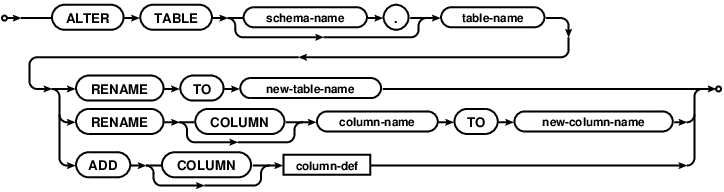
So all you can do with it is adding the column or renaming the table, but in reality you probably need to alter a single column, remove column or change the table constraints. You can achieve this by doing the following operation:
- Rename the table T with old schema to old_T.
- Create the table T with new schema.
- Use "INSERT INTO T (new_columns) SELECT old_columns FROM old_T" query to populate the table T with the data from the renamed table old_T.
- Drop old_T.
You can write a nice wrapper for this yourself, but a) I already did it, so you don't have to and b) there is a very nasty gotcha which would probably cost you few hours of teeth grinding, so do yourself a favor and check this repository out, especially the MigrationsHelper class. It automates the trivial migrations and allows you to define a mappings for situations when you rename the column or add a non-nullable column in new schema.
In the next two posts I'll describe the gotcha I've mentioned in the previous paragraph and show some other non-obvious consequences of doing data migrations.
2013 summary
One year ago I set myself few goals for 2013. Let's take a look how it went:
Meeting two out of three goals and some open source bonus ain't that bad. The gloating part is done, let's move to the wishful thinking part, a.k.a. goals for 2014:
- I gave two talks.
- My blog was viewed over 13k times.
- I have published another game on Nokia Store.
- I have authored or contributed to several open source projects.
Meeting two out of three goals and some open source bonus ain't that bad. The gloating part is done, let's move to the wishful thinking part, a.k.a. goals for 2014:
- Keep giving the talks. I find that preparing the presentation forces me to do thorough investigation of the topic, question all my assumptions and prepare answers for potential questions. This is probably the best way to learn about something, and as a bonus you're sharing that knowledge afterwards.
- Blog more. This year for each post I wrote I have added at least one more topic to my blog todo list. The resolution for this year is clearing this backlog and generating at least 25k views. BTW: when I started this blog I feared that I won't have enough content to write regularly. Bollocks.
- Publish at least one app on Google Play.
- Keep working on the libraries I have published this year. It might not be a perfect metric of how useful to others my work turns out to be, but I'd like to accumulate 200 Github stars total on the projects I authored or co-authored.
The only thing left to be done is to wish you a happy New Year!
Friday, December 27, 2013
To Guava or not to Guava?
I faced this dilemma recently, when I was preparing first release of Cerberus utility for Android. On one hand, in Cerberus I used a tiny subset of Guava features which can be trivially rewritten in vanilla Java in 15 minutes, so maybe I should not force Guava down peoples throat? On the other hand I'm a huge fan of Guava and I think you should definitely use it in anything more complicated than "Hello, world!" tutorial, because it either reduces a boilerplate or replaces your handrolled utilities with better, faster and more thoroughly tested implementations.
The "this library bloats my apk" argument is moot, because you can easily set up the ProGuard configuration which only strips the unused code, without doing any expensive optimizations. It's a good idea, because the dex input will be smaller, which speeds up the build and the apk will be smaller, which reduces time required to upload and install the app on the device.
I found the problem though, which is a bit harder to solve. Modern versions of Guava use some Java 1.6 APIs, which are available from API level 9, so when you try to use it on Android 2.2 (API level 8), you'll get the NoSuchMethodException or some other unpleasant runtime error (side note: position #233 on my TODO list was a jar analyzer which finds this problem). On Android 2.2 you're stuck with Guava 13.0.1.
This extends also to Guava as a library dependency. If one library supports Android 2.2 and older, it forces old version of Guava as dependency. And if another library depends on more recent version of Guava, you're basically screwed.
One conclusion you can draw from this blog post is that you shouldn't use Guava in your open source libraries to prevent dependency hell, but that's spilling the baby with the bathwater. The problem is not Guava or any other library, the problem are Java 1.6 methods missing from Android API level 8! The statistics from Google indicates that Froyo is used by 1.6%, in case of Base CRM user base it's only 0.2%. So more reasonable course of action is finally bumping minSdkVersion to 10 (or event 14), both for your applications and all the libraries.
The "this library bloats my apk" argument is moot, because you can easily set up the ProGuard configuration which only strips the unused code, without doing any expensive optimizations. It's a good idea, because the dex input will be smaller, which speeds up the build and the apk will be smaller, which reduces time required to upload and install the app on the device.
I found the problem though, which is a bit harder to solve. Modern versions of Guava use some Java 1.6 APIs, which are available from API level 9, so when you try to use it on Android 2.2 (API level 8), you'll get the NoSuchMethodException or some other unpleasant runtime error (side note: position #233 on my TODO list was a jar analyzer which finds this problem). On Android 2.2 you're stuck with Guava 13.0.1.
This extends also to Guava as a library dependency. If one library supports Android 2.2 and older, it forces old version of Guava as dependency. And if another library depends on more recent version of Guava, you're basically screwed.
One conclusion you can draw from this blog post is that you shouldn't use Guava in your open source libraries to prevent dependency hell, but that's spilling the baby with the bathwater. The problem is not Guava or any other library, the problem are Java 1.6 methods missing from Android API level 8! The statistics from Google indicates that Froyo is used by 1.6%, in case of Base CRM user base it's only 0.2%. So more reasonable course of action is finally bumping minSdkVersion to 10 (or event 14), both for your applications and all the libraries.
Thursday, December 26, 2013
Offline mode in Android apps, part 1 - data migrations
This year I gave a talk on Krakdroid conference about offline mode in Android apps. By offline mode I mean implementing the app such way that the network availability is completely transparent to the end users. The high level implementation idea is to decouple the operations changing the data from sending these changes through unreliable network by saving the changes in local database and sending them at convinient moment. We have encountered two major problems when we implemented this behavior in Base CRM: data migrations and identifying entities. This blog post describes the first issue.
It might not be obvious why do you need the data migrations, so let's clear this out. Let's say on your mobile you have some data synced with backend (green squares on left and right) and some unsynced data created locally on mobile (red squares on the left).

Now let's say that we introduce new functionality to our app, which changes the schema of our data models (the squares on the backend side are changed to circles).

The schema of the local database have to be changed as well. The naive way of handling this situation is dropping old database with old schema, creating new one with new schema and resyncing all the data from backend, but there are two issues with this approach: if there is a lot of data the resyncing might take a while, which negates the most important advantage of offline mode - that the app is fully functional all the time.

More serious issue is that dropping the old database means that the unsynced data will be dropped along with it.

The only way to provide the optimal user experience is to perform schema migrations locally for both synced and unsynced data:

Migrating the data doesn't sound like a challenging thing to code, but the combination of obscure SQLite and Android issues complicates the matter. Without proper tools it's quite easy to make your code unmaintainable in the long run. I'll describe this issues and our solutions in the further posts.
Tuesday, December 24, 2013
Krakdroid 2013
At the beginning of the December I had an opportunity to gave a talk on a Krakdroid conference. The organizers outdid themselves this year, the venue, other speakers and the overall event atmosphere was amazing. Definitely a place to be at if you're in Krakow at the end of the year.
This year I talked about the offline mode in Android apps. The talk was 30% sales pitch, 10% shameless plug and 60% describing the pitfalls one can fall into when implementing offline mode. I'm going to describe two major problems with offline mode in details on my blog and here are the slides:
Protip on giving a public speech - take a sip of water every 2-3 slides, especially if you're not feeling well and you have a sore throat.
I got an atrocious headache in the afternoon and went home, so I didn't see all the talks, but I've seen the rare thing - a succesful live coding - by +Wojtek Erbetowski who presented the RoboSpock testing framework and incrementally turned a meh-Java code into concise Groove goodness. +Maciej Górski did the maps framework overview, and although he's the author of excellent Android Maps Extensions he managed to be surprisingly objective. The first talk by +Wojtek Kaliciński triggered an internal discussion and Base about reducing the support for old Android versions. It won't happen overnight, but at least we've moved from the dangerous "c'mon, it's not that hard to support Froyo" mindtrack. I'll definitely write more about this.
To summarise, it was a great event. I've learned a lot, I've met some interesting people and I gave another talk, which completes one of the goals I set myself up for 2013. Good stuff.
This year I talked about the offline mode in Android apps. The talk was 30% sales pitch, 10% shameless plug and 60% describing the pitfalls one can fall into when implementing offline mode. I'm going to describe two major problems with offline mode in details on my blog and here are the slides:
Protip on giving a public speech - take a sip of water every 2-3 slides, especially if you're not feeling well and you have a sore throat.
I got an atrocious headache in the afternoon and went home, so I didn't see all the talks, but I've seen the rare thing - a succesful live coding - by +Wojtek Erbetowski who presented the RoboSpock testing framework and incrementally turned a meh-Java code into concise Groove goodness. +Maciej Górski did the maps framework overview, and although he's the author of excellent Android Maps Extensions he managed to be surprisingly objective. The first talk by +Wojtek Kaliciński triggered an internal discussion and Base about reducing the support for old Android versions. It won't happen overnight, but at least we've moved from the dangerous "c'mon, it's not that hard to support Froyo" mindtrack. I'll definitely write more about this.
To summarise, it was a great event. I've learned a lot, I've met some interesting people and I gave another talk, which completes one of the goals I set myself up for 2013. Good stuff.
Tuesday, December 3, 2013
SQLite views gotcha
tl;dr: don't left join on view, or you gonna have a bad time.
I have investigated a performance issue of the db in Android app today. The symptoms looked like a classic case of the missing index: the performance degraded with adding more data to certain tables. However, the quick check of sqlite_master table and looking at some EXPLAIN QUERY PLAN queries indicated that everything is properly indexed (which is not very surprising, given that we use android-autoindexer).
I started dumping the explain query plans for every query and it turned out that some queries perform multiple table scans instead of single scan of main table + indexed searches for joined tables. It means that the indices were in place, but they weren't used.
The common denominator of these queries was joining with a view. Here's the simplest schema which demonstrates the issue:
Of course this behaviour is documented in the SQLite Query Planner overview (point 3 of the Subquery flattening paragraph), and I even remember reading this docs few times, but I guess something like this has to bite me in the ass before I memorize it.
Everything works fine if you copypaste the views selection in place of the joined view, which makes me a sad panda, because I wish SQLite could do this for me. On the other hand it's a very simple workaround for this issue, and, with a right library, the code might even be manageable.
I have investigated a performance issue of the db in Android app today. The symptoms looked like a classic case of the missing index: the performance degraded with adding more data to certain tables. However, the quick check of sqlite_master table and looking at some EXPLAIN QUERY PLAN queries indicated that everything is properly indexed (which is not very surprising, given that we use android-autoindexer).
I started dumping the explain query plans for every query and it turned out that some queries perform multiple table scans instead of single scan of main table + indexed searches for joined tables. It means that the indices were in place, but they weren't used.
The common denominator of these queries was joining with a view. Here's the simplest schema which demonstrates the issue:
sqlite> create table x (id integer);
sqlite> create table y (id integer, x_id integer);

sqlite> explain query plan select * from x left join y on x.id = x_id;
selectid    order       from        detail
----------  ----------  ----------  ----------------------------------------------------------------
0           0           0           SCAN TABLE x (~1000000 rows)
0           1           1           SEARCH TABLE y USING AUTOMATIC COVERING INDEX (x_id=?) (~7 rows)

sqlite> create view yyy as select * from y;

sqlite> explain query plan select * from x left join yyy on x.id = x_id;
selectid    order       from        detail
----------  ----------  ----------  -------------------------------------------------------------------
1           0           0           SCAN TABLE y (~1000000 rows)
0           0           0           SCAN TABLE x (~1000000 rows)
0           1           1           SEARCH SUBQUERY 1 USING AUTOMATIC COVERING INDEX (x_id=?) (~7 rows)
Of course this behaviour is documented in the SQLite Query Planner overview (point 3 of the Subquery flattening paragraph), and I even remember reading this docs few times, but I guess something like this has to bite me in the ass before I memorize it.
Everything works fine if you copypaste the views selection in place of the joined view, which makes me a sad panda, because I wish SQLite could do this for me. On the other hand it's a very simple workaround for this issue, and, with a right library, the code might even be manageable.
Wednesday, November 6, 2013
SQL injection through ContentProvider projection
The SQL injection through query parameters is the common security issue of any system using SQL database. Android is no different than any other system, so if you're using SQLite database in your Android app, you should always sanitize the database inputs.
If you are also using an exported ContentProvider, you need to take care of one more vector of attack: the projection parameter of the queries. Just like SQLiteDatabase, the ContentProvider allows the users to specify which columns they want to retrieve. It makes sense, because it reduces the amount of data fetched, which might improve performance and reduce the RAM footprint of your app. Unlike the SQLiteDatabase, the ContentProvider might be exported, which means that the external applications can query the data from it requesting an arbitrary projection, which are then turned into raw SQL queries. For example:
Basically it means that if you exposed a single uri without sanitizing the projection, you have exposed your entire db.
So how do you sanitize your projections? I've given it some thought and it seems that the only sensible thing to do is allowing only subsets of predefined set of columns.
You cannot allow any expression, because you'd allow any expressions, including SELECTs from other tables and allowing certain expressions is not a trivial task.
You shouldn't ignore the provided projection and return all columns, because one of the benefits of using projections is limiting the amount of data retrieved from database. Besides, certain widely used Google application ignores the existence of Cursor.getColumnIndex method and assumes that the columns will be returned in the same order they were specified in projection. The other app won't work correctly, and the users will probably blame you.
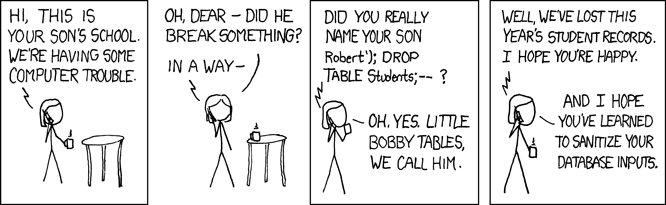 |
| Obligatory XKCD |
'Bobby Tables was here'; DROP TABLE Students; --
* FROM sqlite_master; --
* FROM non_public_table_I_found_out_about_using_previous_query; --
Basically it means that if you exposed a single uri without sanitizing the projection, you have exposed your entire db.
So how do you sanitize your projections? I've given it some thought and it seems that the only sensible thing to do is allowing only subsets of predefined set of columns.
You cannot allow any expression, because you'd allow any expressions, including SELECTs from other tables and allowing certain expressions is not a trivial task.
You shouldn't ignore the provided projection and return all columns, because one of the benefits of using projections is limiting the amount of data retrieved from database. Besides, certain widely used Google application ignores the existence of Cursor.getColumnIndex method and assumes that the columns will be returned in the same order they were specified in projection. The other app won't work correctly, and the users will probably blame you.
Tuesday, November 5, 2013
Android drawables stroke inconsistency
I've run into a funny little problem when creating custom drawables recently - some of the lines were crisp and some were blurred:

After few debug iterations I was able to narrow down the difference to the shapes drawn using the Canvas.drawRoundRect and Canvas.drawPath. The former looked much crispier. I've dug down to Skia classes and it turns out that they reach the same drawing function through slightly different code paths and I guess at some point some rounding is applied at one of them, but I haven't verified this.
The minimal example which demonstrates the issue are two solid XML shape drawables (which are parsed into GradientDrawables), one with radius defined in radius attribute, the other one with four radii defined (can be the same).
Besides satisfying my idle curiosity and honing my AOSP code diving skills, I have learned something useful: do not mix paths and round rects on Canvas and use Path.addRoundRect with radii array when your path contains other curved shapes.

After few debug iterations I was able to narrow down the difference to the shapes drawn using the Canvas.drawRoundRect and Canvas.drawPath. The former looked much crispier. I've dug down to Skia classes and it turns out that they reach the same drawing function through slightly different code paths and I guess at some point some rounding is applied at one of them, but I haven't verified this.
The minimal example which demonstrates the issue are two solid XML shape drawables (which are parsed into GradientDrawables), one with radius defined in radius attribute, the other one with four radii defined (can be the same).
Besides satisfying my idle curiosity and honing my AOSP code diving skills, I have learned something useful: do not mix paths and round rects on Canvas and use Path.addRoundRect with radii array when your path contains other curved shapes.
Sunday, November 3, 2013
Thneed, notes and db design
We're starting to find more and more interesting use cases for Thneed in Base CRM codebase. The first release using it, and few other libraries we recently developed, was released just before the Halloween and we haven't registered any critical issues related to it. All in all, the results look very promising. I won't recommend using Thneed in your production builds yet, but I urge you to star the project on Github and watch its progress.
The Thneed was created as an answer to some issues we faced when developing and maintaining Base CRM, and this fact is sometimes reflected by the API. The example of this is something we internally called PolyModels.
Let's start with a scenario, where we have a some objects and we'd like to add notes to. It's a classic one-to-many relationship, which I'd model with a foreign key in notes table:
Now let's introduce another type of objects, which also can have notes attached to it. We have few options now. The simplest thing to do is to keep these notes in a completely separate table:
The issue with this solution is that we have two separate schemas that need to be updated in parallel, and in 95% of cases would be exactly the same. Another approach is making the objects which contain notes sort of inherit a base class:
These two solutions work perfectly in the "give me all notes for object X" scenario, but it gets ugly if you want to display a single note with the simple "Associated with object X" info. In this case you have to query every model which can contain notes, to see if this particular association references the objects from this model. On top of that, the Noteable table approach requires some additional work to create the entry in
You can always have a several mutually exclusive foreing keys in your notes:
But this solution doesn't really scale well as the number of the models which can contain notes increases. Also, your DBAs will love you if you go this way.
The solution to this problem we used in Base was to have two columns in Notes table: one holding the type of the "noteable" object, i.e. and the other for the id of this object:
The glaring issue with this approach is losing the consistency guarantee - no database I know of support this kind of foreign keys. But when you have SOA on the backend and the notes are stored in a separate database than the noteable objects, this is not your top concern. On mobile apps, even though we have a single database, we use the same structure, because all the other have some implementation issues and worse performance characteristics.
I'm not a db expert, and I haven't found any discussion of similar cases, which means that a) we're doing something very wrong or b) we have just very specific requirements. Let me know if it's a former case.
I needed to model this relationships in Thneed, which tured out to be quite tricky, but that's the topic for another blog post.
The Thneed was created as an answer to some issues we faced when developing and maintaining Base CRM, and this fact is sometimes reflected by the API. The example of this is something we internally called PolyModels.
Let's start with a scenario, where we have a some objects and we'd like to add notes to. It's a classic one-to-many relationship, which I'd model with a foreign key in notes table:
CREATE TABLE some_entity (id INTEGER);
CREATE TABLE notes (
    id INTEGER,
    some_entity_id INTEGER REFERENCES some_entity(id),
    content TEXT
);
Now let's introduce another type of objects, which also can have notes attached to it. We have few options now. The simplest thing to do is to keep these notes in a completely separate table:
CREATE TABLE other_entity (id INTEGER);
CREATE TABLE other_enity_notes (
    id INTEGER,
    other_entity_id INTEGER REFERENCES other_entity(id),
    content TEXT
);
The issue with this solution is that we have two separate schemas that need to be updated in parallel, and in 95% of cases would be exactly the same. Another approach is making the objects which contain notes sort of inherit a base class:
CREATE TABLE notables (id INTEGER);
CREATE TABLE some_entity (id INTEGER, notable_id INTEGER REFERENCES notables(id));
CREATE TABLE other_entity (id INTEGER, notable_id INTEGER REFERENCES notables(id));
CREATE TABLE notes (
    id INTEGER,
    notable_id INTEGER REFERENCES notables(id),
    content TEXT
);
These two solutions work perfectly in the "give me all notes for object X" scenario, but it gets ugly if you want to display a single note with the simple "Associated with object X" info. In this case you have to query every model which can contain notes, to see if this particular association references the objects from this model. On top of that, the Noteable table approach requires some additional work to create the entry in
You can always have a several mutually exclusive foreing keys in your notes:
CREATE TABLE some_entity (id INTEGER);
CREATE TABLE other_entity (id INTEGER);
CREATE TABLE notes (
    id INTEGER,
    some_entity_id INTEGER REFERENCES some_entity(id),
    other_entity_id INTEGER REFERENCES other_entity(id),
    content TEXT
);
But this solution doesn't really scale well as the number of the models which can contain notes increases. Also, your DBAs will love you if you go this way.
The solution to this problem we used in Base was to have two columns in Notes table: one holding the type of the "noteable" object, i.e. and the other for the id of this object:
CREATE TABLE some_entity (id INTEGER);
CREATE TABLE other_entity (id INTEGER);
CREATE TABLE notes (
    id INTEGER,
    noteable_id INTEGER,
    noteable_type TEXT,
    content TEXT
);
The glaring issue with this approach is losing the consistency guarantee - no database I know of support this kind of foreign keys. But when you have SOA on the backend and the notes are stored in a separate database than the noteable objects, this is not your top concern. On mobile apps, even though we have a single database, we use the same structure, because all the other have some implementation issues and worse performance characteristics.
I'm not a db expert, and I haven't found any discussion of similar cases, which means that a) we're doing something very wrong or b) we have just very specific requirements. Let me know if it's a former case.
I needed to model this relationships in Thneed, which tured out to be quite tricky, but that's the topic for another blog post.
Monday, October 28, 2013
Mobilization 2013
I gave the talk at the Mobilization 2013 conference this weekend. I have presented few libraries created at Base CRM to make the data model maintainable. Here are the slides:
Besides giving the talk, I have attended few other very interesting talks: +Wojtek Erbetowski has shown the way they test Android apps at Polidea using RoboSpock; +Mateusz Grzechociński introduced Android devs to new build system and shared an awesome gradle protip: use --daemon command line parameter to shave off few seconds from gradle startup. +Mateusz Herych described the Dagger basics and warned about few pitfalls. Mieszko Lassota described some UI blunders not only from the programming world. Finally, Krzysztof Kocel and Paweł Urban summarised the security pitfalls.
All in all, this years Mobilization conference was a great place to be at. See you there next year!
Besides giving the talk, I have attended few other very interesting talks: +Wojtek Erbetowski has shown the way they test Android apps at Polidea using RoboSpock; +Mateusz Grzechociński introduced Android devs to new build system and shared an awesome gradle protip: use --daemon command line parameter to shave off few seconds from gradle startup. +Mateusz Herych described the Dagger basics and warned about few pitfalls. Mieszko Lassota described some UI blunders not only from the programming world. Finally, Krzysztof Kocel and Paweł Urban summarised the security pitfalls.
All in all, this years Mobilization conference was a great place to be at. See you there next year!
Friday, October 4, 2013
More Guava goodies - AbstractIterator
A while ago I wanted to perform a certain operation for every subsequent pair of elements in collection, i.e. for list [1, 2, 3, 4, 5] I wanted to do something with pairs (1, 2), (2, 3), (3, 4), (4, 5). In Haskell that would be easy:
The zip implementation is pretty straightforward:
Prelude> let frobnicate list = zip (init list) (tail list)
Prelude> frobnicate [1..5]
[(1,2),(2,3),(3,4),(4,5)]
The problem is, I needed this stuff in my Android app, which means Java. The easiest thing to write would be obviously:
List<T> list;
for (int i = 1; i != list.size(); ++i) {
  T left = list.get(i-1);
  T right = list.get(i);

  // do something useful
}
But where's the fun with that? Fortunately, there is Guava. It doesn't have the zip or init functions, but it provides tool to write them yourself - the AbstractIterator. Tl;dr of the documentation: override one method returning an element or returning special marker from endOfData() method result.The zip implementation is pretty straightforward:
public static <TLeft, TRight> Iterable<Pair<TLeft, TRight>> zip(final Iterable<TLeft> left, final Iterable<TRight> right) {
  return new Iterable<Pair<TLeft, TRight>>() {
    @Override
    public Iterator<Pair<TLeft, TRight>> iterator() {
      final Iterator<TLeft> leftIterator = left.iterator();
      final Iterator<TRight> rightIterator = right.iterator();

      return new AbstractIterator<Pair<TLeft, TRight>>() {
        @Override
        protected Pair<TLeft, TRight> computeNext() {
          if (leftIterator.hasNext() && rightIterator.hasNext()) {
            return Pair.create(leftIterator.next(), rightIterator.next());
          } else {
            return endOfData();
          }
        }
      };
    }
  };
}
The tail can be achieved simply by calling the Iterables.skip:public static <T> Iterable<T> getTail(Iterable<T> iterable) {
Preconditions.checkArgument(iterable.iterator().hasNext(), "Iterable cannot be empty");
return Iterables.skip(iterable, 1);
}
For init you could write similar function:public static <T> Iterable<T> getInit(final Iterable<T> iterable) {
Preconditions.checkArgument(iterable.iterator().hasNext(), "Iterable cannot be empty");
return Iterables.limit(iterable, Iterables.size(iterable));
}
But this will iterate through the entire iterable to count the size. We don't need the count however, we just need to know if there is another element in the iterable. Here is more efficient solution:public static <T> Iterable<T> getInit(final Iterable<T> iterable) {
Preconditions.checkArgument(iterable.iterator().hasNext(), "Iterable cannot be empty");
return new Iterable<T>() {
@Override
public Iterator<T> iterator() {
final Iterator<T> iterator = iterable.iterator();
return new AbstractIterator<T>() {
@Override
protected T computeNext() {
if (iterator.hasNext()) {
T t = iterator.next();
if (iterator.hasNext()) {
return t;
}
}
return endOfData();
}
};
}
};
}
All methods used together look like this:List<T> list;
for (Pair<T, T> zipped : zip(getInit(list), getTail(list))) {
// do something useful
}
Monday, September 30, 2013
Mobilization 2013 and Android Tech Talks meetup
I'll give the presentation on this years Mobiliztion conference in Łódź on October 26th:

I'll talk about challenges related to ContentProvider and data model in general we faced during 2 years of development of Base CRM for Android. Even if this particular topic does not concern you, the agenda is ripe with other interesting Android topics: dependency injection with Dagger, Gradle, unit testing, continuous integration. It's not Android specific event - there are also several presentations about other mobile platforms.
If you already have other plans for October 26th, you want to share some war stories related to data model on Android or you just want to talk about Android with fellow geeks, I recommend you a MeetUp happening next week in Kraków: Android Tech Talks #3. I'll give a short topic intro, which (I hope) will be followed by deep, insightful discussion.
I'll talk about challenges related to ContentProvider and data model in general we faced during 2 years of development of Base CRM for Android. Even if this particular topic does not concern you, the agenda is ripe with other interesting Android topics: dependency injection with Dagger, Gradle, unit testing, continuous integration. It's not Android specific event - there are also several presentations about other mobile platforms.
If you already have other plans for October 26th, you want to share some war stories related to data model on Android or you just want to talk about Android with fellow geeks, I recommend you a MeetUp happening next week in Kraków: Android Tech Talks #3. I'll give a short topic intro, which (I hope) will be followed by deep, insightful discussion.
Subscribe to:
Posts (Atom)